🐛 Known Issues
Here we keep track of the currently known issues of Homarr, reported by our community or the developers.
🚨 Adblocker will break and block the posters of TV shows
Many popular ad-blockers will block the posters of TV-shows in your calendar.
Indicators
- Posters are not loading correctly
- Posters are replaced with some content from the ad-blocker
Resolution
Please disable your ad-block for Homarr. Most blockers will offer a switch, where you can disable them for Homarr only.
🚨 Docker container requires a restart after making modifications to the icons
If you are using custom icons, you might be unable to get them working in the apps.
Indicators
- You've mounted the configuration path of Homarr
- You've uploaded / copied icons in the correct folder, specified in our documentation
- You've used the icons in the apps, but they don't display
Resolution
For the time being, restart your docker container after adding / making any changes to your icons.
🚨 Nginx Reverse Proxy may block Homarr's requests to several apps
If you are using Nginx Proxy Manager to open Homarr instance, some features like Torrent download clients or pings, may not work.
Indicators
- Applications have red ping status and on hover you see Offline 403.
- Torrents list and speed widgets dont work
Resolution
Open setings of Hommar instance on Nginx Proxy Manager and disable 'Block common exploits'.
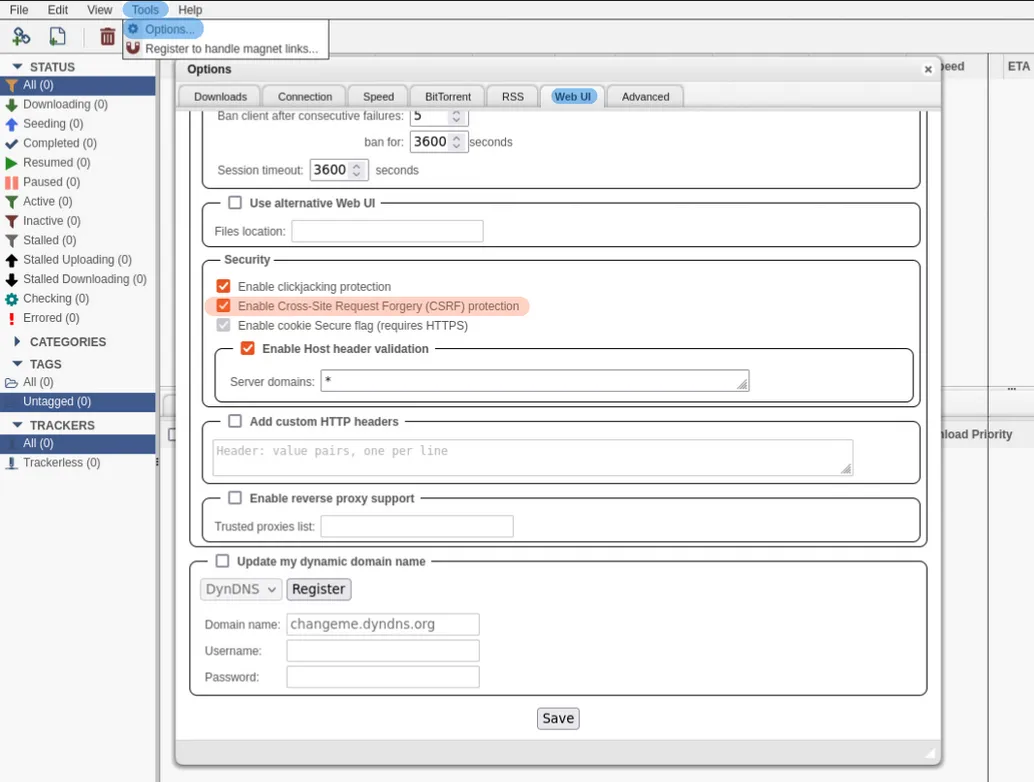
🚨 qBittorrent webUI showing Unauthorized
When creating a qBittorrent tile, The qBittorrent webUI shows an Unauthorized page.
Screenshot
Indicators
- Applications have red ping status and on hover you see Offline 500.
- Torrents list and speed widgets dont work
Resolution
- Log in to your qBittorrent webUI.
- Navigate to Tools > Options > Web UI > Security.
- Uncheck Enable Cross-Site Request Forgery (CSRF) protection.
Screenshot